WiLynk2.1.1
Publisher Description

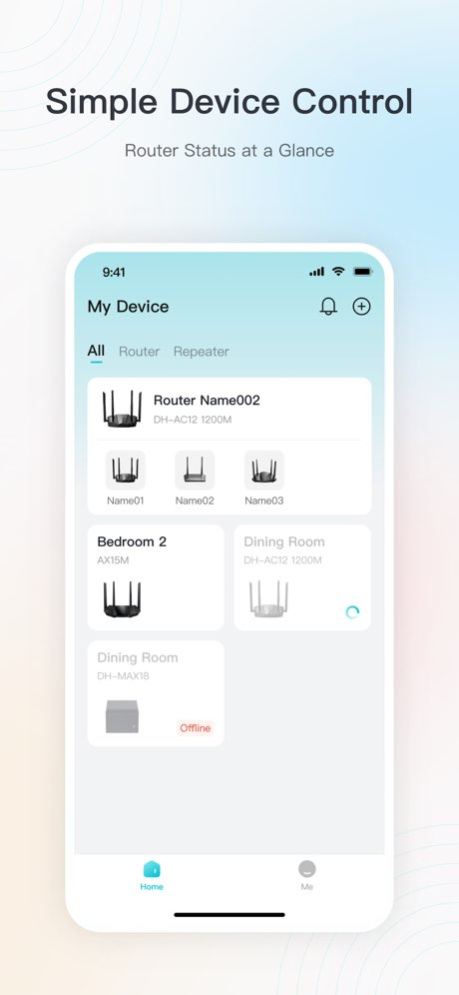


WiLynk V2.0 is available to manage devices anytime, anywhere.
This App can help you better manage routing devices and access terminal devices.
It focuses on improving the functions of ease of use, vision and operation, providing users with convenient and efficient network experience and visualizing network management.
1. Complete operation functions: unified account plan, non-mandatory upgrade, announcement, self-unbind device and other functions;
2. Realize terminal device management, parental control, restart plan, LED control, and guest Wi-Fi functions;
3. Performance optimization: to achieve the page second open effect, improve the experience;
4. UIUE new plan: redesign of page style, interaction logic, LOGO, micro-interaction, etc.;
5. Device access: Two new routing devices can be connected.
Version History Fixed some known issues 2.1.1 07/30/2025 4G Router & Repeater Management: Now you can easily manage both your 4G router and Wi-Fi repeater directly from the app.
LAN Search: Automatically discover and configure new devices connected to your local network.
Upper-Level Network Display: Now view the Wi-Fi name and real-time signal strength of the repeater's extended network for better connectivity insights.
SIM Card Management: Monitor 4G router data usage and set custom alarm thresholds to stay in control of your data consumption. 2.1.0 06/04/2025 This update fixes several issues:
Corrected string usage in French, Greek, Russian, and English.
Resolved device addition and terminal blacklist issues.
Fixed terminal list display problems.
Addressed incorrect WiFi settings.
Corrected dual-band WiFi disabling issues.
Resolved topology display glitches.
Fixed timing discrepancy in parental control roles.
Addressed config caching issues.
Enabled LAN IP changes to different subnets.
Fixed parental control rule activation issues.
Thank you for your support! 2.00.004 01/17/2025 New Version with Fresh Interface
Redesigned Layout & Enhanced Branding
Simplified Setup & Effortless Control
Quick Access to Manage Connected Devices 2.00.001 12/06/2024 New Version with Fresh Interface
Redesigned Layout & Enhanced Branding
Simplified Setup & Effortless Control
Quick Access to Manage Connected Devices 2.00.000 12/05/2024 This latest release fixed some bugs and improved the user experience when log in. 1.00.007 05/06/2024 1.bug fix 1.00.006 04/08/2024 Enhanced user experience: You can use the WiLynk account to seamlessly access other DoLynk products, including DMSS and DoLynk Pro. 1.00.005 04/02/2024 1. Optimized topology logic and display.
2. Supports unbinding devices.
3. Optimized network configuration. 1.00.004 01/26/2024 1.fix bugs 1.00.003 11/06/2023 1. Fix bugs
2. APP supports new models 1.00.002 07/17/2023 Version Update:
- Implemented multi-language support for the app.
- Fixed known bugs. 1.00.001 05/30/2023 1.00.000 05/05/2023
About WiLynk
The company that develops WiLynk is Hangzhou CE-soft Technology Co., Ltd.. The latest version released by its developer is 2.1.1.
To install WiLynk on your iOS device, just click the green Continue To App button above to start the installation process. The app is listed on our website since 2026-10-13 and was downloaded 8 times. We have already checked if the download link is safe, however for your own protection we recommend that you scan the downloaded app with your antivirus. Your antivirus may detect the WiLynk as malware if the download link is broken.
How to install WiLynk on your iOS device:
- Click on the Continue To App button on our website. This will redirect you to the App Store.
- Once the WiLynk is shown in the iTunes listing of your iOS device, you can start its download and installation. Tap on the GET button to the right of the app to start downloading it.
- If you are not logged-in the iOS appstore app, you'll be prompted for your your Apple ID and/or password.
- After WiLynk is downloaded, you'll see an INSTALL button to the right. Tap on it to start the actual installation of the iOS app.
- Once installation is finished you can tap on the OPEN button to start it. Its icon will also be added to your device home screen.
Program Details
System requirements
Download information
Pricing
Version History
version 2.1.1
posted on 2026-10-13
Version History Fixed some known issues 2.1.1 07/30/2025 4G Router & Repeater Management: Now you can easily manage both your 4G router and Wi-Fi repeater directly from the app.
LAN Search: Automatically discover and configure new devices connected to your local network.
Upper-Level Network Display: Now view the Wi-Fi name and real-time signal strength of the repeater's extended network for better connectivity insights.
SIM Card Management: Monitor 4G router data usage and set custom alarm thresholds to stay in control of your data consumption. 2.1.0 06/04/2025 This update fixes several issues:
Corrected string usage in French, Greek, Russian, and English.
Resolved device addition and terminal blacklist issues.
Fixed terminal list display problems.
Addressed incorrect WiFi settings.
Corrected dual-band WiFi disabling issues.
Resolved topology display glitches.
Fixed timing discrepancy in parental control roles.
Addressed config caching issues.
Enabled LAN IP changes to different subnets.
Fixed parental control rule activation issues.
Thank you for your support! 2.00.004 01/17/2025 New Version with Fresh Interface
Redesigned Layout & Enhanced Branding
Simplified Setup & Effortless Control
Quick Access to Manage Connected Devices 2.00.001 12/06/2024 New Version with Fresh Interface
Redesigned Layout & Enhanced Branding
Simplified Setup & Effortless Control
Quick Access to Manage Connected Devices 2.00.000 12/05/2024 This latest release fixed some bugs and improved the user experience when log in. 1.00.007 05/06/2024 1.bug fix 1.00.006 04/08/2024 Enhanced user experience: You can use the WiLynk account to seamlessly access other DoLynk products, including DMSS and DoLynk Pro. 1.00.005 04/02/2024 1. Optimized topology logic and display.
2. Supports unbinding devices.
3. Optimized network configuration. 1.00.004 01/26/2024 1.fix bugs 1.00.003 11/06/2023 1. Fix bugs
2. APP supports new models 1.00.002 07/17/2023 Version Update:
- Implemented multi-language support for the app.
- Fixed known bugs. 1.00.001 05/30/2023 1.00.000 05/05/2023
version 2.1.1
posted on 2025-07-30
Fixed some known issues
version 2.1.1
posted on 2025-07-30
Jul 30, 2025
Version 2.1.1
Fixed some known issues
version 2.00.004
posted on 2025-01-17
Jan 17, 2025
Version 2.00.004
This update fixes several issues:
Corrected string usage in French, Greek, Russian, and English.
Resolved device addition and terminal blacklist issues.
Fixed terminal list display problems.
Addressed incorrect WiFi settings.
Corrected dual-band WiFi disabling issues.
Resolved topology display glitches.
Fixed timing discrepancy in parental control roles.
Addressed config caching issues.
Enabled LAN IP changes to different subnets.
Fixed parental control rule activation issues.
Thank you for your support!
version 2.00.001
posted on 2024-12-06
Dec 6, 2024
Version 2.00.001
New Version with Fresh Interface
Redesigned Layout & Enhanced Branding
Simplified Setup & Effortless Control
Quick Access to Manage Connected Devices
